
README.md (8575B)
1  2 3 An arbitrary-precision Decimal type for JavaScript. 4 5 [](https://www.npmjs.com/package/decimal.js) 6 [](https://www.npmjs.com/package/decimal.js) 7 [](https://travis-ci.org/MikeMcl/decimal.js) 8 [](https://cdnjs.com/libraries/decimal.js) 9 10 <br> 11 12 ## Features 13 14 - Integers and floats 15 - Simple but full-featured API 16 - Replicates many of the methods of JavaScript's `Number.prototype` and `Math` objects 17 - Also handles hexadecimal, binary and octal values 18 - Faster, smaller, and perhaps easier to use than JavaScript versions of Java's BigDecimal 19 - No dependencies 20 - Wide platform compatibility: uses JavaScript 1.5 (ECMAScript 3) features only 21 - Comprehensive [documentation](https://mikemcl.github.io/decimal.js/) and test set 22 - Used under the hood by [math.js](https://github.com/josdejong/mathjs) 23 - Includes a TypeScript declaration file: *decimal.d.ts* 24 25 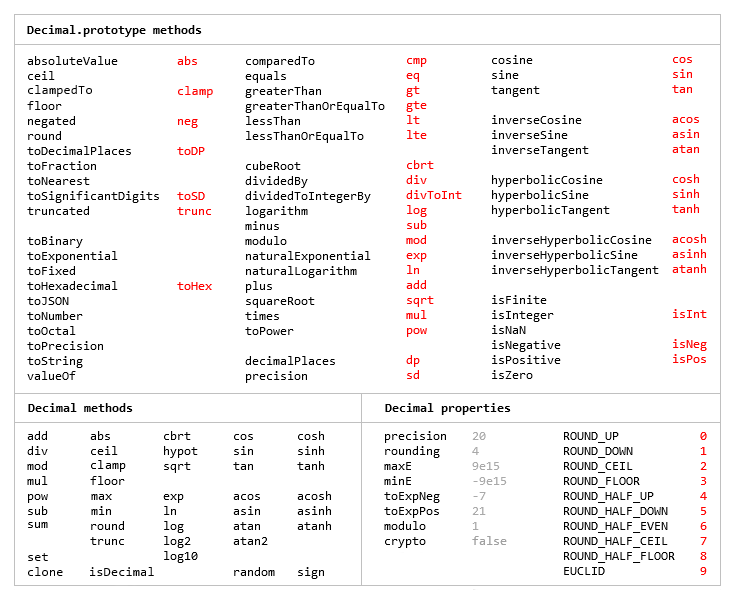 26 27 The library is similar to [bignumber.js](https://github.com/MikeMcl/bignumber.js/), but here 28 precision is specified in terms of significant digits rather than decimal places, and all 29 calculations are rounded to the precision (similar to Python's decimal module) rather than just 30 those involving division. 31 32 This library also adds the trigonometric functions, among others, and supports non-integer powers, 33 which makes it a significantly larger library than *bignumber.js* and the even smaller 34 [big.js](https://github.com/MikeMcl/big.js/). 35 36 For a lighter version of this library without the trigonometric functions see 37 [decimal.js-light](https://github.com/MikeMcl/decimal.js-light/). 38 39 ## Load 40 41 The library is the single JavaScript file *decimal.js* or ES module *decimal.mjs*. 42 43 Browser: 44 45 ```html 46 <script src='path/to/decimal.js'></script> 47 48 <script type="module"> 49 import Decimal from './path/to/decimal.mjs'; 50 ... 51 </script> 52 ``` 53 54 [Node.js](https://nodejs.org): 55 56 ```bash 57 npm install decimal.js 58 ``` 59 ```js 60 const Decimal = require('decimal.js'); 61 62 import Decimal from 'decimal.js'; 63 64 import {Decimal} from 'decimal.js'; 65 ``` 66 67 ## Use 68 69 *In all examples below, semicolons and `toString` calls are not shown. 70 If a commented-out value is in quotes it means `toString` has been called on the preceding expression.* 71 72 The library exports a single constructor function, `Decimal`, which expects a single argument that is a number, string or Decimal instance. 73 74 ```js 75 x = new Decimal(123.4567) 76 y = new Decimal('123456.7e-3') 77 z = new Decimal(x) 78 x.equals(y) && y.equals(z) && x.equals(z) // true 79 ``` 80 81 If using values with more than a few digits, it is recommended to pass strings rather than numbers to avoid a potential loss of precision. 82 83 ```js 84 // Precision loss from using numeric literals with more than 15 significant digits. 85 new Decimal(1.0000000000000001) // '1' 86 new Decimal(88259496234518.57) // '88259496234518.56' 87 new Decimal(99999999999999999999) // '100000000000000000000' 88 89 // Precision loss from using numeric literals outside the range of Number values. 90 new Decimal(2e+308) // 'Infinity' 91 new Decimal(1e-324) // '0' 92 93 // Precision loss from the unexpected result of arithmetic with Number values. 94 new Decimal(0.7 + 0.1) // '0.7999999999999999' 95 ``` 96 97 As with JavaScript numbers, strings can contain underscores as separators to improve readability. 98 99 ```js 100 x = new Decimal('2_147_483_647') 101 ``` 102 103 String values in binary, hexadecimal or octal notation are also accepted if the appropriate prefix is included. 104 105 ```js 106 x = new Decimal('0xff.f') // '255.9375' 107 y = new Decimal('0b10101100') // '172' 108 z = x.plus(y) // '427.9375' 109 110 z.toBinary() // '0b110101011.1111' 111 z.toBinary(13) // '0b1.101010111111p+8' 112 113 // Using binary exponential notation to create a Decimal with the value of `Number.MAX_VALUE`. 114 x = new Decimal('0b1.1111111111111111111111111111111111111111111111111111p+1023') 115 // '1.7976931348623157081e+308' 116 ``` 117 118 Decimal instances are immutable in the sense that they are not changed by their methods. 119 120 ```js 121 0.3 - 0.1 // 0.19999999999999998 122 x = new Decimal(0.3) 123 x.minus(0.1) // '0.2' 124 x // '0.3' 125 ``` 126 127 The methods that return a Decimal can be chained. 128 129 ```js 130 x.dividedBy(y).plus(z).times(9).floor() 131 x.times('1.23456780123456789e+9').plus(9876.5432321).dividedBy('4444562598.111772').ceil() 132 ``` 133 134 Many method names have a shorter alias. 135 136 ```js 137 x.squareRoot().dividedBy(y).toPower(3).equals(x.sqrt().div(y).pow(3)) // true 138 x.comparedTo(y.modulo(z).negated() === x.cmp(y.mod(z).neg()) // true 139 ``` 140 141 Most of the methods of JavaScript's `Number.prototype` and `Math` objects are replicated. 142 143 ```js 144 x = new Decimal(255.5) 145 x.toExponential(5) // '2.55500e+2' 146 x.toFixed(5) // '255.50000' 147 x.toPrecision(5) // '255.50' 148 149 Decimal.sqrt('6.98372465832e+9823') // '8.3568682281821340204e+4911' 150 Decimal.pow(2, 0.0979843) // '1.0702770511687781839' 151 152 // Using `toFixed()` to avoid exponential notation: 153 x = new Decimal('0.0000001') 154 x.toString() // '1e-7' 155 x.toFixed() // '0.0000001' 156 ``` 157 158 And there are `isNaN` and `isFinite` methods, as `NaN` and `Infinity` are valid `Decimal` values. 159 160 ```js 161 x = new Decimal(NaN) // 'NaN' 162 y = new Decimal(Infinity) // 'Infinity' 163 x.isNaN() && !y.isNaN() && !x.isFinite() && !y.isFinite() // true 164 ``` 165 166 There is also a `toFraction` method with an optional *maximum denominator* argument. 167 168 ```js 169 z = new Decimal(355) 170 pi = z.dividedBy(113) // '3.1415929204' 171 pi.toFraction() // [ '7853982301', '2500000000' ] 172 pi.toFraction(1000) // [ '355', '113' ] 173 ``` 174 175 All calculations are rounded according to the number of significant digits and rounding mode specified 176 by the `precision` and `rounding` properties of the Decimal constructor. 177 178 For advanced usage, multiple Decimal constructors can be created, each with their own independent 179 configuration which applies to all Decimal numbers created from it. 180 181 ```js 182 // Set the precision and rounding of the default Decimal constructor 183 Decimal.set({ precision: 5, rounding: 4 }) 184 185 // Create another Decimal constructor, optionally passing in a configuration object 186 Dec = Decimal.clone({ precision: 9, rounding: 1 }) 187 188 x = new Decimal(5) 189 y = new Dec(5) 190 191 x.div(3) // '1.6667' 192 y.div(3) // '1.66666666' 193 ``` 194 195 The value of a Decimal is stored in a floating point format in terms of its digits, exponent and sign, but these properties should be considered read-only. 196 197 ```js 198 x = new Decimal(-12345.67); 199 x.d // [ 12345, 6700000 ] digits (base 10000000) 200 x.e // 4 exponent (base 10) 201 x.s // -1 sign 202 ``` 203 204 For further information see the [API](http://mikemcl.github.io/decimal.js/) reference in the *doc* directory. 205 206 ## Test 207 208 To run the tests using Node.js from the root directory: 209 210 ```bash 211 npm test 212 ``` 213 214 Each separate test module can also be executed individually, for example: 215 216 ```bash 217 node test/modules/toFraction 218 ``` 219 220 To run the tests in a browser, open *test/test.html*. 221 222 ## Minify 223 224 Two minification examples: 225 226 Using [uglify-js](https://github.com/mishoo/UglifyJS) to minify the *decimal.js* file: 227 228 ```bash 229 npm install uglify-js -g 230 uglifyjs decimal.js --source-map url=decimal.min.js.map -c -m -o decimal.min.js 231 ``` 232 233 Using [terser](https://github.com/terser/terser) to minify the ES module version, *decimal.mjs*: 234 235 ```bash 236 npm install terser -g 237 terser decimal.mjs --source-map url=decimal.min.mjs.map -c -m --toplevel -o decimal.min.mjs 238 ``` 239 240 ```js 241 import Decimal from './decimal.min.mjs'; 242 ``` 243 244 ## Licence 245 246 [The MIT Licence (Expat).](LICENCE.md)